In updating my Blog Resource Page, all the information written moved here. It is still current and helpful, but things I recommend and why need revision. This post has more explanation of the why and wherefore for using certain choices than I think is best for a no-frills resource list.
If you are new to blogging, sort through the following advice for timesavers and tips.
Free Themes
I recommend the default WordPress themes to start out with, unless you are sure you know what you want. There are free child themes available for them. Between the choices that all have the name “Twentysomething” (series starting with ten, you should be able to find a theme that suits your blogging needs.
The Swift theme was one that I used on this site for awhile and warmed up to it.
Update I had to change the Swift theme to the PageLines since the hackers kept getting into the Swift theme, which shows that security is a big deal in choosing a theme.
I have always liked the typography of PageLines, though I did miss the bright colors of Swift. Plus, I don’t think there should be a free theme that only gets updated to work well, forcing you to buy the premium version. That is something to watch out for, although it is much less likely to happen now. Not a problem with the bigger theme developers who have a reputation to stake.
I did a test-drive of the default free themes on this site before deciding to use Divi.
Paid Themes
I use Elegant themes (Divi) in my garden sites, and one of the earlier ones on TrueGrit, a religion blog.
I switched from experimenting with their new themes to using mainly their pride production: the Divi theme. It has pros and cons. Although as time goes on the improvements are wiping out the negative opinions.
Pros
Divi is highly customizable and can do about anything you want it to.
It is responsive (extremely important, now).
Easy to work with.
Cons
The main thing I don’t like is one of the things I also do like: the pagebuilder.
The pagebuilder uses shortcode components that helps you build a page the way you want it. Making landing pages, etc is simple. But if you change from the Divi to another theme like the WordPress default, all the pages which you built show only the shortcode blocks .
This is highly inconvenient, to be locked into one theme.
Solution?
A plugin that helps to sort out the shortcodes coding on the site, or changes made by the ET developers to make all of the shortcode reside within a plugin that remains no matter what theme is chosen.
Looking For A Theme
Find features you need.
Pleasing layout and typography for readability.
Responsiveness now tops the list of needed features.
Support might be important for you, and regular updating certainly will be.
Now Using Fourteen Sixteen Theme
Further Update: WordPress made the good looking magazine theme for 2014 and I switched to it. I am very happy with so many of its features that I imagine staying with it for quite awhile.
Further, Further Update: I kept updating until the twentysixteen theme. It doesn’t have the customizing plugins, nor is it easy to change the look. I love it for its functionality, though.
It is a good beginning theme. However I will say that for a complex site like my Garden site, the Divi pro theme from Elegant Themes is better suited to what I ask from WordPress.
There are several good social sharing helps, right now I use Shareaholic, which includes related posts I used YARPP for years, and that worked well, too -especially with new improvements it has now.
Akismet to deal with Spam. Bruteprotect to deter hackers. These are in the Jetpack. Yes, I use it.
There is controversy about the Jetpack, but I used enough of its features to make it worthwhile. It disturbs me to know that some feel it bloats and greatly increases loadtime for the site.
I switched back to YARPP after Shareaholic made changes that I really didn’t like. I no longer recommend it and deleted the plugin from all my sites.
Disclosure: I use affiliate links for some of the resources. This in no way influences the opinions I post. Everything written is transparent and based on my experience.
A Theme Is Expected to Make your Content Look Good
First Steps In Blogging: Choosing Your Theme
I have been blogging ever since 2004, and for the greater portion of that time I have used WordPress for the platform (although I have also used others including Blogger). I’m one of those experimenters who is always changing things around, so I have used countless theme templates for my blogs.
I know it can get confusing sorting through the thousands of template choices, which seem to do a hundred different things, so I thought new bloggers, or people thinking of setting up their own blogs might benefit from some of my experience.
WHAT YOU WILL FIND HERE:
A quick rundown on what it takes to start blogging, and then a look at some of the types and choices of themes that will help you forge your online presence.
Start with a simple theme that best serves your site’s purpose. Or go with a professional theme that gives lots of support through forums, etc. Once you are used to the way a designer structures the themes, especially if there is an underlying framework (like Genesis), you will find your way around it and get it to function for you through familiarizing your self with the way that particular theme works.
This won’t tell you that any particular designer is the best, but just to give you, the new blogger, a beginners guide to sorting through a huge playing field of theme designs.
5 Blogging Decisions
Top 5 Website Decisions
Choose your platform
Choose your theme
Choose plugins
Write content and decide frequency of posting
When and how to monetize your site
These are the most important decisions to make when you begin a blog.
Choose The WordPress Theme For The Purpose Of Your Site
Because WordPress is one of the most popular platforms, it has been extended through themes and plugins for all sorts of special uses. Some themes have special plugins incorporated right inside to make things wonderfully flexible and useful.
It used to be that each theme had its plugins for common features like slideshows, etc.
The prevailing wisdom is to allow those features to be handled by plugins as they are commonly used: separately.
News, Food, Photos? Ecommerce?
Most of the professional lines of WordPress theme designers have a whole slew of specialized themes all ready for you to create the exact type of site you want.
Photo blogs need to highlight their great pictures. Art blogs are similar. Portfolio highlights which have images instead of text for entries or large images with minimal text serve these sites well.
For most blogs a typical 2 column style with either a left or right hand sidebar is the classic theme choice.
Wordpress blogs are so versatile that they can look like almost anything and function for many purposes from ecommerce to community sites (with the addition of buddypress or bbpress). The more complex the use requirements the more likely the theme will be highly complex and probably professional, costing a fee.
Those themes are a far cry from the early ones that had just a small number of templates.
What Is a Template?
The structures inside the theme which create posts, pages, contact pages, 404 pages, archives, etc.
How to Install a WordPress Theme in your Hosting Site
https://youtu.be/HE1Vy3kXtBM
Your Blogging Experience
Free Or Professional Themes For WordPress?
In blogging, one of the first things you will decide is the platform. This is the general software that supports your blogging site. WordPress is one of the most popular today, and can be both self-hosted (you pay for your hosting and run your blog on the server space of your hosting plan) or free, through WordPress.com. Other platform examples:
Blogger
Typepad
Tumblr
Drupal
But since you have made the choice for WordPress, the next big decision is how you want your site to look and act, and that “frontend” experience is dictated by your “theme”.
Themes can be both simple and extremely complex, they can be free or professional (themes that you buy) also known as “Premium themes”. When I first blogged, I used only free themes. I now need more features and I have purchased professional themes.
Once You Decide on WordPress, the Fun Begins
At first it might seem there is little difference between free themes and pro, especially if you can find a free theme with support, with a community centered around troubleshooting and guiding newbies. There are even free themes with complex features, and a great look.
But generally, a pro theme will have a higher level of design expertise, good code, and be kept up to date in compliance with the many upgrades that WordPress has engineered in recent years. In the case of the “Hybrid core” themes: the themes are free, but the support forums and articles require a paid membership.
I found many years ago that keeping up with the complexity of code, features that I wanted, and time to design were just too much for me as an individual blogger. I broke down and purchased a Pro theme membership. Membership- what’s that? OK. In professional themes there are often two ways to go:
Buy a single theme for a set amount of money OR buy a membership to a design company you like and have access to many themes and the support of experts. The choices are yours (choices, choices!).
Always Changing
The internet, and thus the type of writing and the look of websites, is always changing. The one thing that impacts wp theme choice today is the transition of web users to mobile phones. No longer is the desktop the primary way we access the web. This has resulted in another choice that we ought to be making:
CHOOSE A RESPONSIVE THEME FOR YOUR BLOG.
A responsive theme is one that looks good in a variety of size screens, and adjusts well to mobile users.
Most web designers are creating their frameworks and themes to be responsive now, but if you have made a previous decision, check to be sure your present one has “responsive” features.
My Own Challenges
I write lots of content and the field I blog in is crowded, and getting more crowded every day, so I need something that will stand out. One of the biggest problems for me has been the pagespeed, or time necessary to load a page on your computer screen. The template is going to impact these challenges.
CHILD THEMES ARE RECOMMENDED
The updates for WordPress result in the need for the templates to update, as well. When that happens many of the customizations are lost. Some themes have an interface which helps to preserve your changes either through use of an area to add your css or to add a “child theme”. I like it when the designer adds easy customizations to the backend or admin are of the theme.
Tips To Help You Choose The Right Theme
Make a List. Do you want a blog, a gallery of photos or art? Need a portfolio for clients or e-commerce possibilities? What do you want people to do on your site?
Check how much support is given for the theme. Is there support from creator or forum? How satisfied are the users of the theme? Take note of these things and add it to your decision.
Check structure and flexibility of the theme. Does it have the type of pages you need? Are the style and your content a good fit?
About The Major WP Theme Players
Who Are They? What Are Their Benefits?
Some of these well known designer companies started with free themes. I used them in the past. This is not a definitive list, just some comments about the ones I know enough about to have opinions about their themes. The first two are theme platforms (theme structures that support many different styles).
Divi Is ET’s Cadillac Theme
Divi is their premier theme.
Elegant Themes
The following information is outdated. Elegant Themes has almost exclusively concentrated on its DIVI theme and it has so changed and updated it that it is very user friendly now. The only thing I wish I had realized at the beginning is that when building posts and pages in their builder, the coding shows up if you ever want to with to another format. The way this is given a work-around is to then install the divi builder as a plugin.
DIVI is the one I ended up paying for, probably because I am kind of artsy in my predilection for theme looks, and Elegant themes has one of the most artful, and just plain pretty, looks to their themes.
Elegant Themes, by Nick Roach, are a bit complex, but made easier with the back end epanel that automates most decisions of style and action. Support is so-so, but I don’t have other experience to compare it with. The entire line of many themes- all sorts of styles and basic purpose (they have a dynamite portfolio page) themes to choose from.
I have some affiliate links, if you decide to buy their themes and want to possibly support me in some small way. Note: I became an affiliate after I liked their themes, and am not advocating because I am an affiliate.
It seems like many of the best free themes went professional, and some of theme have limited free versions available. “Platform” Pagelines is one of those, look for others.
Platforms are the software that run the blog. WordPress is a platform for blogging. “Framework” is the basic structures under the “parent themes”, underneath those are the”child themes”. The platform runs all the functions and bells and whistles in the background, the theme or the framework has the basic and not so basic features that creates the look and use of the site. A parent theme is alone or under the child theme, which “sits on top” and is called for creating the specific look of the theme- the colors, graphics, and typography, as well as special templates. It can completely change the way the parent theme is experienced by visitors.
Not all themes are built apart from special frameworks, but many of the pro theme are, and the looks are usually the result of child themes. Look for Thesis and Genesis family themes to have this type of setup.
Best Theme? Review And Advice
What Are The Big Changes In Themes?
Mobile friendly has gone from a suggestion to mandatory. This is driven by the shift of users from desktops to their phones for most internet use.
Design plainly favors a “flat look” that is directly related to its good looks on a phone screen.
Functions increasingly move from inside the theme to a separate plugin.
Style ranges, but a light modern look reigns. Alternatively, handcrafted, like watercolor elements has grown in popularity.
Clean interface and fast loading becomes ever more important for a professional site.
Thesis Theme by DIYThemes
Thesis is used by some of the most successful bloggers, but so is Genesis. It has a more open look.
At first this was the premier theme platform that all the serious bloggers wanted, Genesis has since caught up.
I used the designer’s, Chris Pearson, famous ‘Cutline’ theme for quite awhile on one of my blogs. His design technique is clean and he was known for his beautiful typography. The Thesis theme has a distinctive clear grid that supports all sorts of features. I have not purchased it. Some love this theme, others found it complex to work with (word on the street of bloggers I “follow”.)
Personally, I would consider working with it just because of its nice open feel.
Genesis Theme
I used Brian Gardner’s themes before he started “Studiopress” and loved them. If I had been ready to buy a theme at that time, I would have stayed with and bought what turned into the “Genesis” theme. I am still considering it, although I hate to switch from themes I am familiar with ( learning curve when starting to use a new type of theme).
Genesis themes have a distinctive blocky look that is eye-catching and easy to navigate. They can be highly customized (in my experience). They are very well supported.
What are the assets and liabilities of these choices?
Free
Pro
Costs nothing
Costs a fee
unlimited styles,some great,some poor
pro styling
sometimes supported, usually by fans
usually supported, by experts
often has built-in links to theme creator
links can be deleted
What Was I Using?
Past tense because I bought a premium set of themes that did not live up to the promises. Caveat emptor.
Both Elegant Themes and Studiopress have proved reliable.
I also purchased and used Elegant Themes, and Studiopress, which I had used in the past.
Each one has a learning curve to use, but they also provide forums and support.
Presently, I use Elegant Themes on almost all my sites, but still experiment with the latest free WP theme that comes shipped with the software. A few are on the Genesis platform.
Become A WordPress Ninja
I WISH I HAD A GUIDE IN THE EARLY YEARS OF STARTING A WORDPRESS BLOG
There is no reason for a steep learning curve with all the great learning resources available today. A book will condense all the important steps so you can start the important part: writing all your great content.
Go to the forums or get some initial support to know what your theme can do for your site. It will save you lots of time and otherwise you may not use all the features.
I am updating my Blog Resource Page, all the outdated information previously written moved here.
So much has changed and is now so radically different that this post has to be completely re-written.
If you are new to blogging, sort through the following advice for timesavers and tips.
Free Themes
I still recommend the default WordPress themes to start out with, unless you are sure you know what you want. The format that the present form of WordPress uses utilizes blocks. Use this and familiarize yourself with it since it will save you lots of hassle.
I am still not used to it, and have a “classic” plugin to help me write posts with the editor I am most familiar with- but if you get used to the block system that is much better.
The Themes that come Automatically
Choices all have the name “Twenty[something]” (series starting with twenty, you should be able to find a theme that suits your blogging needs.
I used all sorts of themes until settling onto the Divi from Elegant themes.
I had fits and starts with many of the themes- I would recommend finding the one you like and sticking with it.
I did a test-drive of the default free themes on this site before deciding to use Divi. It is a very powerful theme and probably more than most people need for their sites. I also used Genesis. It is not updated as often.
Paid Themes
Most paid themes have a base engine theme with childthemes to give the look and elements you desire.
Elegant Themes has reduced its efforts to two main themes, but Divi is the main one, and its newest form Divi 5 is very different than the older forms.
Pros
Divi is highly customizable and can do about anything you want it to.
Easy to work with.
Cons
The main thing I don’t like is one of the things I also do like: the pagebuilder.
The pagebuilder moved away from shortcode components. It now uses a block system as far as I can explain it, and you really need to learn how to navigate around all the customizations.
Because it is so popular there are many resources to help you with this theme. There is a very helpful blog to train in all the features as well as give some freebies.
You are still locked into this theme if you use it.
Looking For A Theme
Find features you need.
Pleasing layout and typography for readability.
Speed now tops the list of needed features.
Support might be important for you, and regular updating certainly will be.
What About Plugins?
These provide features for simpler themes,
They can be ways to speed up the site but condensing your images and other optimizations.
Don’t overload with plugins, try to find just the ones you need.
Plugins I Need
I like Yoast’s plugin for SEO and readability analysis.
Elegant themes has Monarch, I like those within the Yoast plugin. Simple Social Plugins is good.
Akismet to deal with Spam. Protections included in the Jetpack plugin. Yes, I sometimes use it. It has a lot of bloat. I no longer use it on this site, only the Akismet.
There is controversy about the Jetpack, but I used enough of its features to make it worthwhile. It disturbs me to know that it can greatly increase loadtime for the site.
I used YARPP (Yet Another Related Posts Plugin) but it is not longer used in WP sites. That’s okay, there are built-in related posts in the theme now.
This is a hard decision, much more difficult than it should be. I will write more in this space. but for now… I have chosen Siteground for probably the past ten years. Ever since I left Netfirms, however long ago that was!
Disclosure: I use affiliate links for some of the resources. This in no way influences the opinions I post. Everything written is transparent and based on my experience.
Improve or Begin to Write About Your Garden Experience
The world of garden writing is a varied one. Most of us think of it as pure nonfictional writing that covers the how-to of gardening, making a garden, and growing plants, but the best garden writing incorporates more, and there are pockets of garden writing that soar with inspirational prose and are hybridized with spiritual and motivational writing.
Write What You Know
…And write what you love, but that is not all.
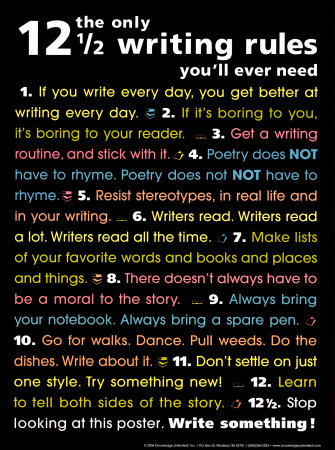
Spelling is important.
Punctuation is important.
Work on improving your writing skills, consistently.
I want to write things for which my only explanation for writing is not, “I needed the money.â€
Improve Your Writing Skills – Keep writing inspiration and tips handy
“Don’t tell me the moon is shining; show me the glint of light on broken glass.” – Anton Chekhov.
Poetic and rhetorical devices to enhance your writing. Work on improving the beauty and magic of your words.
Get to the gist of your goal to become a garden writer. Covering such topics as the “how-to” article and giving guidance on writing well, the will help you interest your reader and organize your outlines. The all important story telling gets a chapter, along with the nuts and bolts you will need for your blog or book.
Different Styles
…of writing are good to know and practice.
Garden Writing is Technical Writing
Though it may be primarily dressed in another form
In a sense all garden writing is technical writing. When the subject includes so much of science, such as horticulture and botany, a certain amount of precision and accuracy is needed. It is necessary to both identify the plants properly and to discuss the matter of designing and growing a garden well.
Even in a romantic fictional piece of garden-focused writing, it is important to get plant nomenclature and description correct for the reader to fully appreciate the thought and emotion being conveyed. To use some wordplay, it roots the imagination into the the fertile, substantive source of the writing.
How will the transport of the scent of lilacs be truly understood if the writing isn’t clear about the context of place, and the nature of the plant? Lilacs, for instance, are known to survive for a long time, surviving the ruin of a house or the disappearance of the other original signs of human habitation. The scent is a musky, heady sweet fragrance, and the shrub was once planted in almost every dooryard of old farmhouses. It is a plant that connects generations, and their memories of their own old homesteads…sometimes miles from where the family would finally settle. Understanding a plants persistence or ephemeral nature, its scent or unpleasant smell, where one might have happened upon it, or who was likely to grow it may make a world of difference in how to incorporate the response to a characteristic, the gardens, and the plantings into a story.
How-To Writing
In writing “how-to” information the technical aspects are easy to see. For success on the part of the reader, they need all the accurate information necessary to accomplish their desired task. Use expert information, and if anecdotal information is included, please label that so the reader can take that point into consideration in their own set of conditions.
Plants have many romantic common names, and there are enough duplicates which refer to very different plants to create some confusion, so the use of Latin names ( as frustrating as that can sometimes be…see the case of the aster or the autumn clematis…)
Make it a rule to use Latin plant names, whenever possible.
Record up to date information on hardiness, etc.
How to Write About Gardening: Get a Camera, Open a Blog, Start Writing
Most garden writing is “how-to” essay writing. It is largely non-fiction, although some of the best writers do use a story telling style as they describe their activities or what impressions nature makes on their lives. The format of “How to Grow” or “5 Tips to…” “10 Plants…” etc. also work well.
Try to visualize your audience. Is it a new gardener, or someone who is experienced and wants something new?
I personally do not like highly hyped garden writing, which is common in the genre. Not everything is easy, beautiful, or must-have in gardening. In fact, gardening is a highly individual occupation, with a range of tastes in what is considered ideal both in in style and method. Hype sells more, but restraint and valuable information educates leading to the success of the reader and the future cultivation of the hobby.
Anyone can have a beautiful garden that functions well for their family with all the planning helps and online tutorials that are available. I really believe that. It only requires taking the time to watch some videos and read some articles before you are ready to face the challenges and choices of making a garden.
Now, mind you, I;m not saying it is easy… or even simple, but it is easy and simple to start. And those first steps are supported with expert advice that is as close as your iPhone or PC to support you along the way.
The great thing about nature is that it wants to grow and thrive. So you are bound to have a number of successes. Failures are just learning opportunities, anyway. Write about both your successes and your failures; they both make interesting reading material.
Keep It Conversational
Writing in a conversationally is a style that mimics the way we communicate verbally. Almost all my online writing is done in this manner, which means I play fast and loose with numerous ellipses, sentence fragments, and such devices.
Common Writing Tips To Review – Do you have these skills under your belt?
“Read a lot and write a lot.” – Stephen King
Be clear, and edit, edit, edit.
Avoid cliches.
Use, but don’t overuse, adjectives and adverbs.
Try to use as many of the five senses as possible.
Research and validate your facts.
Who’s Who in Garden Writing – A sampling of those authors I like, and why
You may not be familiar with her name, as she was an American garden writer more popular in the past generation, but Helen Van Pelt Wilson was a writer whose warmth and love of garden plants sparked enthusiasm for creating gardens and growing things for many, including me. I recently purchased two of her out-of-print books through Amazon, so I could have copies on my bookshelf, since I had borrowed the library’s copies so many times.
His writing is clear, fascinating, and expert. John Brookes tackles the difficult task of covering a wide range of topic and does so with seeming ease. I love his books, filled with the best of illustrations to inspire and informative in the way only an excellent teacher can match. I own many of his books, and would gladly own them all.
Penelope Hobhouse
I love English Garden Writers in general, but Penelope Hobhouse has been the one to mark my sense of garden color and fired up my imagination more than any other. She, too, tackles very broad garden subjects, but it is her intimate garden experiences which I love to hear about and the illustrations of her matchless garden plant combinations which inform my own gardening.
Tracy Disabato-Aust
This is a garden writer from my own native Ohio. That is not why she is one of the best garden book authors, though. She creates garden books which are practical, inspiring, and ultimately the best for American gardeners. She manages to provide expert information that almost any gardener in the USA can use. That is a tall order for so vast and varied a country, but perhaps that accomplishment is due to her great design sense and the fact that she concentrates on the plants. You learn much about gardening by reading her books and they point to straight to the garden to put the head knowledge into experience. She is my favorite contemporary author, at this time.
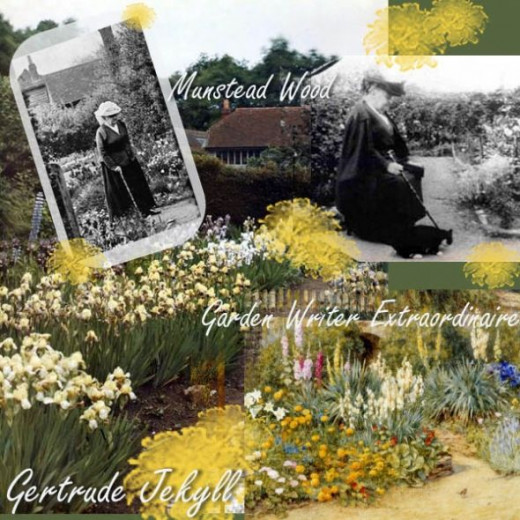
Gertrude Jekyll
Gertrude Jekyll is an example of how a garden writer may be an arbiter of taste and change the landscape of how we make our gardens. Influenced herself by William Robinson, her writing grew from her landscape design prowess and reputation. She is still influential today and her ideas are the foundation of creating perennial borders and monochromatic gardens. Her most famous books have reappeared in reprints that are revised for plants name accuracy ( since many of the names have changed over the years) and with colored illustrations.
Penelope Hobhouse – Expert and Enjoyable Garden Writer
Penelope Hobhouse is an example of fine garden writing at its best, from her expertise on plants to her accurate and enjoyable prose.
Start your own collection of her fine tomes.Her expert guidance through some of the great gardens makes for an excellent tour.
Garden Writing
Ilona’s Garden is a Website…. and my garden
I write about what I know – a key to better writing
Some websites are impersonal things. They are a company or about a product, or general information or lots and lots of information and writers. That is great- sometimes it is just what you need and want. But sometimes someone has decided to share a bit of their life and the wisdom garnered from their own experiences. That is what my garden website consists of, in Ilona’s Garden. Come visit with me and read about the plants I love or what I know about garden design. Or you can visit the blog on my new domain:Â Ilona’s Garden Journal for conversation and whatever is going on in the garden and during the season….
If you would like to know more about gardening my website holds the keys of my experience of many years in my central Ohio yard. It is always growing! I like to blog, play around with trying new stuff, garden (of course).
Designing for Zazzle and Cafepress are two new avenues I’m taking. Mainly on Zazzle, to help supplement income for online costs and to use my graphics and photos in an alternative way.
Little Known Secret About Garden Information Online
writing secrets
Maybe it is better known than I think, but the web is flooded by poor or just plain wrong garden information. It is true… and garden writers, in the confines of their hangouts sometimes will bemoan the fact. It isn’t a matter of a gateway, or a degree, or anything like that. It is a matter of experience with plants and gardens.
I noticed this when I was first writing my beginning pages on Geocities. There were garden websites that were getting quite popular, even though their creators knew little about gardening…. they were quite good at marketing and at making community. That is an expertise in itself, but it doesn’t help people garden successfully, except when they share their own hard won advice. And that is the secret sauce: real gardeners who like to talk “over the fence” about what is working for them and the basic how-to science and art of making a garden ( things like propagating plants, and building soil….etc,etc.).
Right now, there are a flood of garden writers coming online and making blogs from mainline media, like magazines and newspapers. It raises the quality of the writing, and sometimes of the information, but it also seems to bring the system of inbred networking and impersonal disconnect from that industry. That is just my opinion, you may think differently, but I still hold out for the individual voice of the everyday gardener who will tell you the truth when something won’t work for you. Or is just as glad at a small vegetable patch as at a magazine ready potager layout. Because it is all just as good, when it comes to people loving their little plot or -if they have it- spacious stretch of landscape, whatever makes it yours. Size doesn’t matter; well, it kind of does, but not in the way we think (mostly in how much work is involved).
Anyway, I want you to know why I keep laboring on creating a website for gardeners. I have LOTS of information and links going out to other great sources . It isn’t always easy to find my sites in the flood of new websites and blogs! But that is OK, once you find it I hope you will bookmark and then offer your suggestions on how it can be better for you. I invite you to do that by commenting on this lens, or joining the Ilona’s Garden Facebook page, which has discussion and comment opportunities and you can upload pictures of your own gardens,etc. That is an idea! I love other people’s gardens.
The marketing and writing lesson which I could away from the Squidoo community and others that count in creating truly helpful information is “to focus inâ€. That was something that was starting to get obvious as early as a couple years into writing about gardening. It is a huge topic when all the variables are factored in: climate,soil, plants,environments, animals,even fashions…. So my focus is not just Ohio, but on the groundfloor of “Central Ohio”. And from there everyone who has similar circumstances or similar needs for plants can benefit.
The little known secret for everyone is to find quality sources for your garden information. Sometimes hooking in with someone who gives you leads and links. That is why I started The Garden Librarian, too – to wade through the many garden books and find the best.
I switched to the Mac when I had to replace my laptop. There is so much going for the design and capability of this tool that you will be happy you made the decision to buy it.
A Place To Write – A Beautiful Inspiration To Write Daily
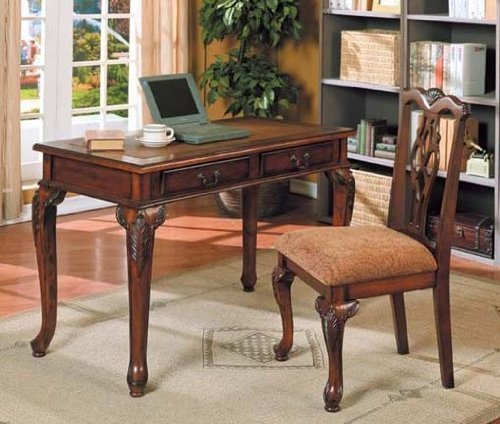
Can you imagine yourself sitting at a lovely writing desk, before a large window looking out into a blooming garden? can you picture yourself inspired to write all about the effects of the garden on your life, on your thoughts, and how you created the gardens with love? Can you convey the emotion of your heart when you peer into the face of your favorite flower? If you are not a garden writer yet, you may have all the makings of one. Give it a try.
34 Writing Tips That Will Make You a Better Writer A couple of weeks ago we asked our readers to share their writing tips. The response was far beyond the initial expectations, and the quality of the tips included was amazing. Thanks for everyone who contributed. Now, without further delay…
Expert Tips For Better Writing One of the things I like best about social media is the way it helps me discover talented writers. They remind me a lot of distance athletes with their…
My family also uses Amazon Prime often, which saves us money on shipping and more.
Please support my site by using my links, thank you. This Page may contain affiliate links. “As an Amazon Associate I earn from qualifying purchases”


 Divi is their premier theme.